Setting Up Your Profile for Success
Your profile is your first impression. Other contractors decide whether to send you leads based on what they see here. A half-finished profile = fewer leads. Simple as that.
Why Your Profile Matters
When a contractor has a referral to send, they browse profiles and pick who to send it to. They're looking at:
- Your lead fee — what you pay when you accept a lead. A higher fee attracts more referrals your way.
- Verification badges — phone ✅, identity ✅, bank ✅
- Your bio and experience
- Service categories and area
- Trust level and ratings
If your profile is blank, they're picking someone else. Period.
Upload a Professional Photo or Logo
A clean company logo or a headshot works best. Skip the blurry cell phone pic from 2014.

Write a Bio That Builds Trust
Keep it short and real. Hit three things:
- Years of experience — "13 years in residential painting" beats "we do good work"
- What you specialize in — be specific ("exterior repaints on 2-story homes")
- Where you work — "Nashville and surrounding counties"
Profiles with bios get more leads because senders trust them more. Two sentences is plenty.
Choose the Right Service Categories
Don't pick everything. Pick what you're actually good at and want leads for. If you're a painter, don't add "General Contracting" just to cast a wider net — you'll get leads you can't handle and your acceptance rate tanks.
You can also add sub-specialties within a category. For painting, that might be "Cabinet Refinishing" or "Commercial Interior." These help senders match you with the right jobs.
Set Your Service Area
Be honest about where you'll actually drive. Claiming a city an hour away means you'll get leads you reject — which wastes everyone's time. Stick to areas where you'd realistically take a job.
Set Your Lead Fee
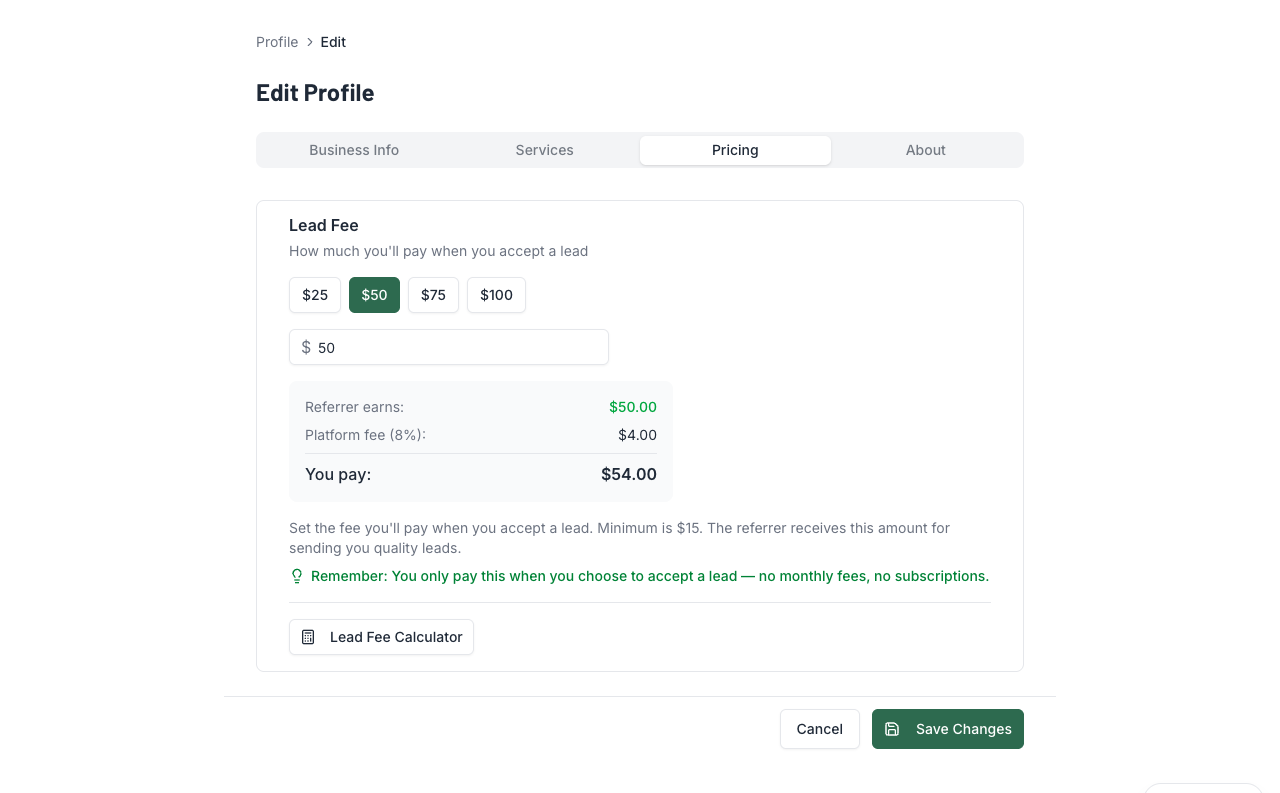
Your lead fee is what you'll pay when you accept a lead someone sends you. The range is $15 to $1,000, with common presets at $25, $50, $75, and $100.
There's also a 10% platform fee on top. So if you set your lead fee to $50, you'll pay $55 total when you accept a lead — and the contractor who sent it earns $50.
Get All Three Verification Badges
Your profile shows three checkmarks. Get them all:
- Phone ✅ — Verify via SMS code. Takes 30 seconds.
- Identity ✅ — Stripe Identity check (photo ID + selfie). Takes ~2 minutes.
- Bank ✅ — Connect your bank through Stripe Connect. Takes ~5 minutes.
You can't send or receive leads until identity and bank are done. Phone isn't technically required, but it shows up as a trust signal — senders notice.
💡 Pro Tips
- Lead fee sweet spot: Base it on your trade's average job value. A $50 lead fee is a no-brainer if the average paint job is $3,000.
- Fill out your bio. Even two sentences. "15 years residential painting in Middle TN. Specialize in exterior repaints." That's enough.
- Verify your phone even if you prefer email notifications — it's a trust signal on your profile that senders look for.
- Do all verifications during setup. It takes 10 minutes total. You can't do anything on the platform without identity + bank, so just knock them all out at once.