Team Management — Adding Team Members
Got employees or salespeople who could be sending leads? Add them to your team so they can send leads under your company name — and you keep control of everything.
What Are Team Accounts?
Team accounts let your people send leads on behalf of your business. They sign up with their own email, but everything rolls up to your company account. All earnings go to the company — not individual members.
The Three Roles
- •Owner (you) — Full control. Manage members, permissions, billing, everything.
- •Admin— Can manage most things: invite members, adjust settings, view earnings. Can't delete the account or change billing.
- •Member— Sends leads within the limits you set. That's it.
How to Add a Team Member
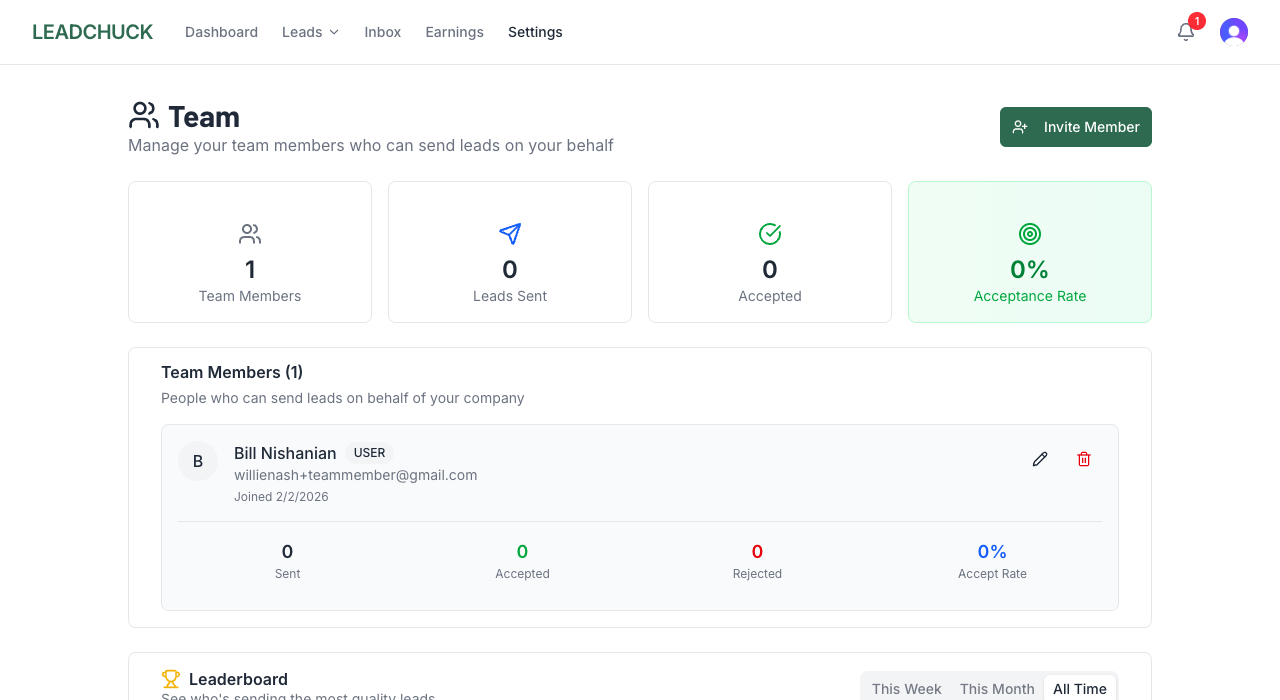
- 1.Go to Settings → Team
- 2.Enter their email address
- 3.Pick their role (Admin or Member)
- 4.Set their permissions (see below)
- 5.They'll get an invite email — once they accept, they're in
Team members skip the regular setup process since they operate under your business identity. They just create a login and start sending.
Permissions You Can Set
Each team member gets their own set of guardrails:
- •Max leads per week — Cap how many leads they can send. Start low, increase as they prove themselves.
- •Favorites only— Restrict them to only send leads to contractors you've already vetted.
- •Can add favorites — Let them discover and save new contractors, or lock it down.
- •Can invite other contractors — Allow them to grow your network (and earn referral credits).
- •Can view earnings — Show or hide the money side. Your call.
The Team Leaderboard
See who's sending the most leads and who's getting the best acceptance rates. It's a simple ranking of your team members' activity — and a natural way to create some friendly competition.
💡 Pro Tips
- •Start members on "favorites only" with a low weekly limit. As they prove they send good leads, loosen the restrictions.
- •Use the leaderboard to gamify it. Your crew will compete to send the most leads. Maybe buy lunch for the top sender each month.
- •All earnings go to the company account.Members don't get paid through LeadChuck — that's between you and them.
- •Train your team on what makes a good lead.One bad sender can tank your company's trust level. Make sure everyone knows the rejection categories.
Need help setting up your team? Contact us.